My Agent Tasks: Close the Loop Between Your Code, Your Services, and Your AI Agents
OSC now lets you create scheduled AI agent tasks that run against your own code and your own unmodified open source services. Your agents work on the same repo that deploys to My Apps, against the same real PostgreSQL, Valkey, and ClickHouse instances, on a cron you control.
There is a gap that most AI development workflows leave open. You write code with an AI assistant. You deploy it to some platform. You provision a database. But none of those three things know about each other at runtime. The agent that helped you write the app is not watching the app. It is not checking whether the data pipeline is healthy. It is not opening PRs when the dependency scanner finds a CVE. It just helped once, and then it was done. My Agent Tasks on Open Source Cloud closes that gap. You can now create scheduled AI agent tasks that run on a cron against your own git repository and your own OSC service instances. The same code your app runs. The same Postgres, the same Valkey, the same ClickHouse. The agents keep working after you stop.
What Shipped
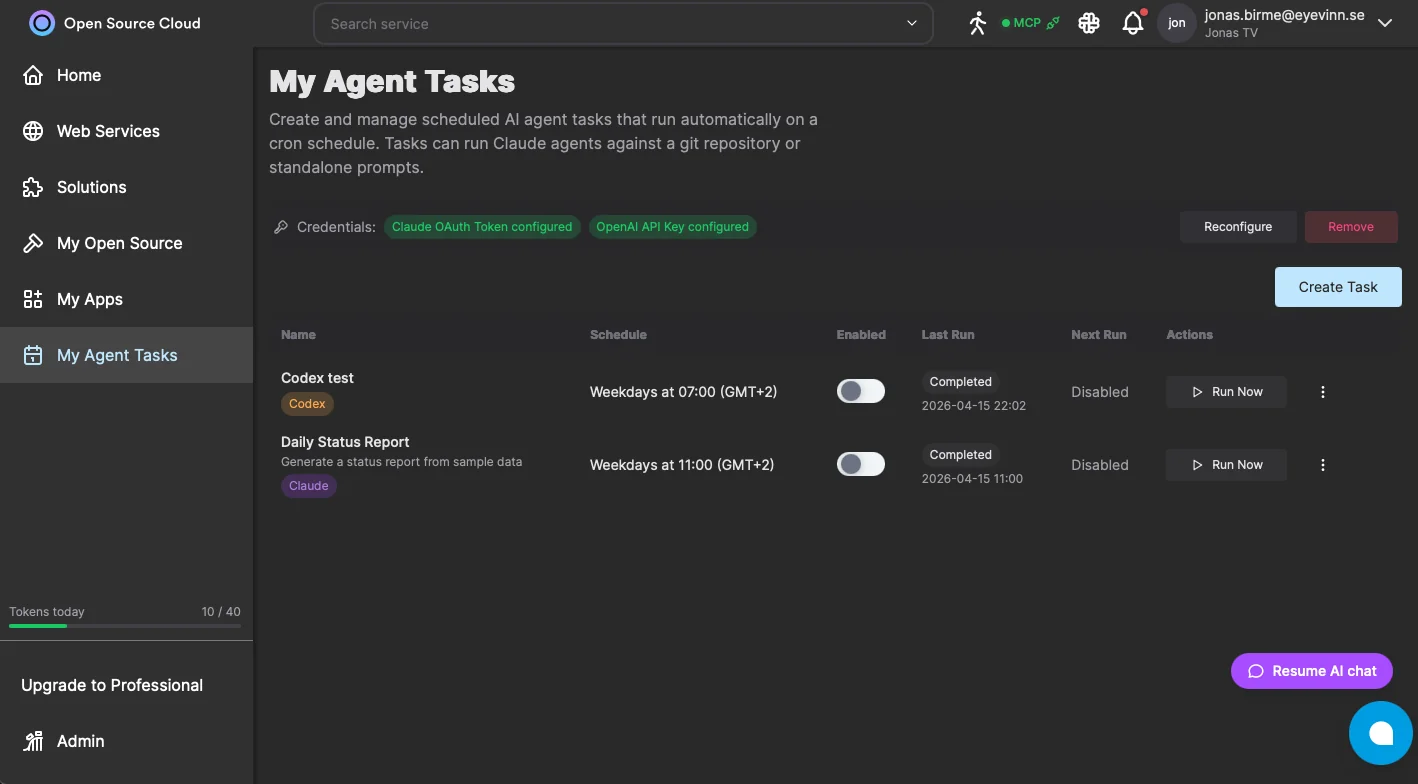
My Agent Tasks is a new section in the OSC web app at app.osaas.io. At the top is a Credentials panel where you configure your Claude OAuth token and OpenAI API key once. Every task you create reuses those credentials, so rotating a key updates all your scheduled tasks at once. Each task has a name, a description, a prompt describing what the agent should do, a Source URL pointing at a git repository, and optionally a Git Token for private repos. You pick a runner, either Claude or Codex, and set a schedule. Schedules follow a cron-like format, so "weekdays at 07:00" or "every Sunday at 02:00" are both straightforward to express. The task list shows you each task's name, schedule, enabled status, last run result, next scheduled run, and a Run Now button for on-demand execution. Enable and disable tasks with a toggle without deleting them.
The Loop That Was Missing
My Apps on OSC lets you deploy code from a git repository as a running service. Node.js, Python, Go, WASM, .NET: point at a repo, pick a runtime, get a live HTTPS endpoint. The OSC service catalog gives you 196+ unmodified open source services to connect to: databases, caches, message queues, object storage. What was missing was the third leg: a way for an AI agent to operate continuously on that same repo and against those same services, on a schedule, without a human in the loop. Agent Tasks is that third leg. Your code is in the repo. Your data is in OSC services. Your agent runs on the same substrate, knows where to look, and does the work that would otherwise require a developer to remember to do it manually.
What You Can Actually Build With This
A few concrete patterns that become straightforward with scheduled agent tasks. Nightly dependency maintenance. A task with a Source URL pointing at your app repo and a prompt like "audit npm dependencies, apply safe patch upgrades, run the test suite, open a PR with the results." The same pattern runs on the OSC dev team's own codebase every morning. It catches CVEs and outdated packages before they become incidents. Data pipeline monitoring. A task pointed at a repo that contains your analytics scripts, with a prompt that runs the scripts against a ClickHouse instance on OSC, checks for anomalies in the last 24 hours, and posts a summary to a Slack webhook. Runs daily. You wake up to a report instead of a surprise. Issue triage and PR drafting. A task pointed at your repo that reads issues labeled "ai-refactor" or "good-first-agent-task", picks one per run, and opens a scoped PR with implementation and tests. One issue at a time, every weekday morning, without anyone on the team needing to queue it up. Documentation sync. A task pointed at your docs repo with a prompt that reviews merged PRs from the previous day and updates docs to match. No more docs that silently diverge from the implementation.
How to Define a Task

When you click Create Task, the modal asks for four things: a Name (required), a Description (optional, for your own reference), a Prompt (required, the instruction to the agent), and a Source URL (required, the git repository the agent will operate on). The Source URL field supports two patterns. The first is your application repository: the agent clones it, runs against your code, opens PRs, and interacts with whatever OSC services your app uses. The second is a repository of agent team definitions: a collection of specialized sub-agent prompts and role files the agent loads at startup, spawning a coordinated team rather than a single generalist. That second pattern is how the OSC dev team runs its own scheduled automation across multiple repos. For private repositories, add a Git Token. The token is stored encrypted and never appears in task output. After creation, the task appears in your list with the next scheduled run time pre-calculated. You can Run Now immediately to verify the prompt produces the output you expect before the first scheduled execution fires.
Claude and Codex: Bring Your Own Agent Runner
Both Claude (Anthropic) and Codex (OpenAI) are first-class runners. You configure credentials for both in the same Credentials panel, and you pick the runner per task. The rest of the execution model is identical: same Source URL, same schedule, same OSC infrastructure underneath. This matters because teams are split on which model they trust for which work. Claude tends to be stronger for multi-step reasoning, code review, PR authoring, and tasks that require reading context across many files. Codex tends to be stronger for targeted code generation and direct transformation tasks. You do not have to pick one for everything. A nightly dependency audit might run on Claude; a targeted refactoring task might run on Codex. Run both, compare the outputs, keep what works. The credential you store is used by every task assigned to that runner. Swap the API key in one place and all tasks update. There is no per-task credential management.
Why Unmodified Services Matter Here
When an agent task runs against your infrastructure, it is operating on real data. The agent querying your ClickHouse instance is querying the same ClickHouse you would query with clickhouse-client. The agent that connects to your Postgres is connecting to the same upstream PostgreSQL that pg_dump works against. This matters for a few reasons. First, the agent does not need to learn a proprietary API layer. The OSC services speak the same protocols and accept the same SQL, the same HTTP APIs, the same CLI tools as the upstream open source software. There is no OSC-specific SDK for your agent to import. Second, and more important: the agent's work is portable. A PR the agent opens against your repo is just a git PR. Data the agent writes to your Postgres is just Postgres data. If you move your infrastructure somewhere else tomorrow, nothing the agent produced is locked to OSC. The substrate is open, and so is everything built on top of it.
Get Started
My Agent Tasks is live at app.osaas.io. Open the My Agent Tasks section, configure your credentials once, and create your first task. If you already have services running on OSC and a repo deployed via My Apps, you have everything you need. The loop is ready to close.
Frequently Asked Questions
Does running agent tasks consume my OSC tokens?
Agent tasks run Claude or Codex using credentials you configure in the Credentials panel. The AI model usage is billed directly against your Anthropic or OpenAI account, not your OSC token balance. OSC tokens are consumed only by the infrastructure services your tasks operate on.
How do agent credentials work? Are they shared across tasks?
You configure credentials once in the Credentials panel at the top of the My Agent Tasks page. A Claude OAuth token and an OpenAI API key can both be stored. All tasks in your account reuse those credentials. You do not embed keys per task, so rotating a credential updates it for every scheduled task at once.
Can agent tasks access my My Apps services and OSC databases?
Yes. Tasks that specify a Source URL clone your repository and run the agent against it. The agent has access to your OSC account and can read and write to your running service instances, including databases, caches, and any service you have deployed. This is the key integration: the agent operates on the same infrastructure your app uses.
What is the difference between the Claude and Codex runners?
The Claude runner uses Anthropic Claude models and is well suited to tasks involving code review, documentation, PR authoring, and multi-step reasoning. The Codex runner uses OpenAI Codex and targets code generation and transformation tasks. Both run against the same infrastructure. The choice depends on which model performs better for your specific task prompt.
Does this lock me in to OSC in any way?
No. Every service your agent tasks operate on is unmodified open source software. Your code stays in your own git repository. The agent tasks themselves are just prompts and schedules. If you stop using OSC, your repo is unchanged, your data is portable via standard database tools, and there is nothing OSC-specific inside your codebase.
Related Posts
Agentic SDLC: the Human-Gated AI Coding Pipeline on Open Source Cloud
An AI agent that triages issues, writes code, and proposes changes. A mandatory review gate that controls what deploys. An authorization model where the deploy token lives on the server and the agent never touches it.
From Vibe Coding to Agentic Engineering: What Your Infrastructure Needs to Keep Up
Vibe coding gets you to a working prototype fast. Agentic engineering gets it to production and keeps it there. Here is what the infrastructure gap looks like up close.
Your Vibe-Coded App Deserves Better Than a Credit Tax
Credit-based AI builders charge per generation. When free tiers expire, real costs emerge. Deploy your vibe-coded app on real infrastructure, no credits, no counter.